Manual.ly Logo

Turtle Beach Stealth 500 (2024) Manual

0,0 · 0 Valoraciones

Manual en PDF · 1 Páginas

Español

M: QW-35-FL
página

/ 1

Loading...
5a804f4bd14fff10ca6bd1227ca58fef4f29 page 1
Regulatory Compliance Statements for the STEALTH 500
(Wireless Gaming Headset – Headset Model: HWBB0005 & Dongle Model: HWAA0005)
Federal Communications Commission (FCC) Compliance Notices
Class B Interference Statement
This equipment has been tested and found to comply with the limits for a Class B digital device, pursuant to Part 15, Subpart B of the FCC Rules.
These limits are designed to provide reasonable protection against harmful interference in a residential installation. This equipment generates, uses,
and can radiate radio frequency energy and, if not installed and used in accordance with the instructions,
may cause harmful interference to radio
communications. However, there is no guarantee that interference will not occur in a particular
installation. If this equipment does cause harmful
interference to radio or television reception, which can be determined by turning the equipment o and on, the user is encouraged to try to correct
the interference by one or more of the following measures:
• Reorient or relocate the receiving antenna.
• Increase the separation between the equipment and receiver.
• Connect the equipment into an outlet on a circuit dierent from that to which the receiver is connected.
• Consult the dealer or an experienced radio/TV technician for help.
FCC Caution:
This device complies with Part 15 of the FCC Rules. Operation is subject to the following two conditions: (1) This device may not
cause harmful
interference, and (2) this device must accept any interference received, including interference that may cause undesired
operation. This product is
compliant with the Consumer Product Safety Improvement Act of 2008, Public Law 110314 (CPSIA)
FCC RF Radiation Exposure Statement:
This equipment complies with FCC radiation exposure limits set forth for an uncontrolled environment. End users must follow the specific
operating instructions for satisfying RF exposure compliance. This transmitter must not co-located or operating in conjunction with any other
antenna or transmitter.
CANADA-statement
This device complies with Innovation, Science and Economic Development Canada’s licence-exempt RSS(s).
Operation is subject to the following two conditions :
(1) This device may not cause interference; and
(2) This device must accept any interference, including interference that may cause undesired operation of the device.
Le présent appareil est conforme aux CNR d’Innovation, Sciences et Développement économique Canada exempt(s)
de licence(s) applicables aux appareils radio exempts de licence. L’exploitation est autorisée aux deux conditions suivantes :
(1) l’appareil ne doit pas produire de brouillage ;
(2) l’utilisateur de l’appareil doit accepter tout brouillage radioélectrique subi, même si le brouillage est susceptible
d’en compromettre le fonctionnement.
Radiation Exposure Statement:
The product complies with Canada portable RF exposure limits set forth for an uncontrolled environment and are safe for intended operation
as described in this manual. The further RF exposure reduction can be achieved if the product can be kept as far as possible from the user body
or set the device to lower output power if such function is available.
Le produit est conforme aux limites d‘exposition pour les appareils portables RF pour les Etats-Unis et le Canada établies pour un environnement
non contrôlé Le produit est sûr pour un fonctionnement tel que décrit dans ce manuel. La réduction aux exposition RF peut être augmentée si
l’appareil peut être conservé aussi loin que possible du corps de l‘utilisateur ou que le dispositif est réglé sur la puissance de sortie la plus faible si
une telle fonction est disponible.
Battery Caution:
• Do not disassemble, impact, squeeze or throw into fire;
• Do not continue to use if severe swelling;
• Do not place in a high temperature environment;
• Do not use after the battery is flooded;
• Do not use any charger other then that specifically provided for use with the equipment;
• Dispose of used batteries according to the instructions.
QUICK START GUIDE
GUIDE DE DÉMARRAGE RAPIDE
IMPORTANT
READ BEFORE USING
IMPORTANT
LIRE AVANT UTILISATION
STEALTH 500
CERTIFICATION MODEL:
HEADSET: HWBB0005
DONGLE: HWAA0005
For warranty information and service, please visit www.turtlebeach.com/warranty
WARRANTY SERVICE FOR PURCHASES IN AUSTRALIA
Our goods come with guarantees that cannot be excluded under the Australian Consumer Law. For complete details please visit
www.turtlebeach.com/warranty.
To make a warranty claim in Australia during the Warranty Period, Purchaser should contact the VTB repair centre:
Tecworks International Pty Ltd, 13 Distribution Place, Seven Hills NSW 2147, Tel: 1300 074 512
Turtle Beach Europe Ltd is obligated as a producer with a main activity of selling under The Producer Responsibility Obligations (Packaging Waste)
Regulations 2007. To fulfill our obligation we are registered with Comply Direct and their Recycling Room. Here you will find advice and information
on packaging waste management, recycling symbols and the waste hierarchy principles of reduce, reuse and recycle.
https://www.complydirect.com/the-recycling-room/ For instructions in other languages, please visit http://www.turtlebeach.com/homologation
Copyright © 2024, Voyetra Turtle Beach, Inc. All rights reserved. No part of this document may be reproduced without permission. Any product
names mentioned in this manual may be trademarks or registered trademarks and are the property of their respective owners.
P/N: 426-252-005-500 RC
This symbol on the product or its packaging indicates that this product must not be disposed of with your other household waste.
Instead, it is your responsibility to dispose of your waste equipment by handing it over to a designated collection point for the
recycling of waste electrical and electronic equipment. The separate collection and recycling of your waste equipment at the time
of disposal will help conserve natural resources and ensure that it is recycled in a manner that protects human health and the
environment. For more information about where you can drop o your waste for recycling, please contact your local authority,
or where you purchased your product.
European Union and European Fair Trade Association (EFTA) Regulatory Compliance
Declaration of Conformity
Marking by this symbol:
Hereby, Voyetra Turtle Beach Inc. declares that Stealth 500 Headset Model: HWBB0005 & Dongle Model: HWAA0005
is in compliance with Directive 2014/30/EU(EMC), 2014/53/EU(RED), 2014/35/EU(Safety), 2015/863 amending Annex II to 2011/65/
EC(RoHS), 2012/19/EU (WEEE), 2006/1907/EU (REACH), 94/62/EC (PACKAGING), 2006/66/EC (Battery), Electromagnetic Compatibility
Regulations 2016(EMC), Radio Equipment Regulations 2017(Radio), Electrical Equipment Regulations 2016(Safety), The Restriction of the
Use of Certain Hazardous Substances in Electrical and Electronic Equipment Regulations 2012.
The full text of the EU/UK declaration of conformity is available at the following internet address: http://www.turtlebeach.com/homologation
Radio frequency: 2400MHz 
Operating frequency: 2400~2483.5MHz 
Max. Output power: 4 dBm
Warning:
To prevent possible hearing damage, do not
listen at high volume levels for long periods.
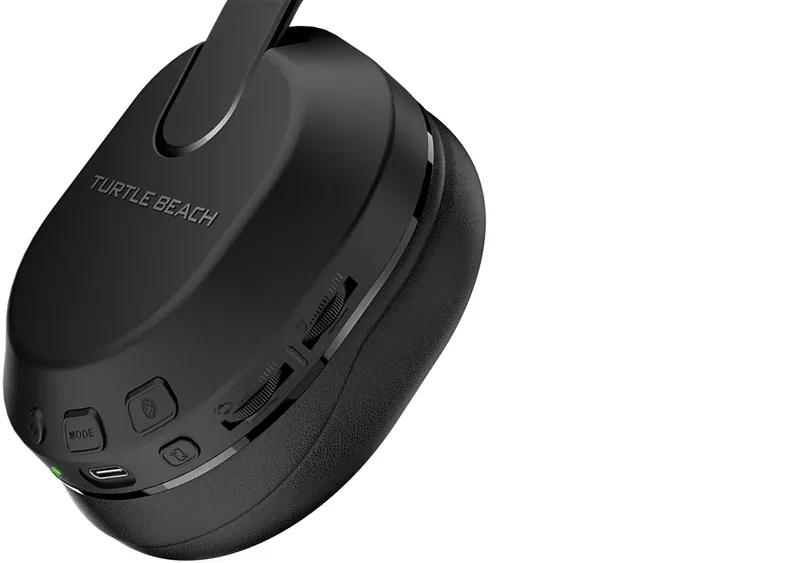
HEADSET CONTROLS | COMMANDES DU CASQUE
QuickSwitch Button
Press (1s) = Switch between
2.4GHz Wireless and
Bluetooth modes
Bouton QuickSwitch
Appuyer (1s) = Basculer
entre les modes RF 2,4 GHz
et Bluetooth
LED Status Indication
Indication de statut LED
EQ Mode Button
Bouton de mode égaliseur
Power Button,
Superhuman Hearing
Press (2s) = Power on/o
Press (1s) = Superhuman
Hearing on/o
Bouton d‘alimentation,
Superhuman Hearing
Appuyez (2s) = Allumer/éteindre
Appuyez (1s) = Superhuman
Hearing on/o
Game / Chat Mix ,
Variable Mic-Monitoring
Game / Chat Mix on Xbox version only
Variable Mic-Monitoring on PlayStation
and PC versions
Volume de réglage du chat/micro
Volume du chat sur la version Xbox
uniquement. Volume de réglage du retour
micro sur les versions PC et PlayStation
Bluetooth Multi-Function
Button (MFB)
See Bluetooth Pairing setup
Bouton multifonction
Bluetooth (MFB)
Voir la configuration de
l‘appairage Bluetooth
Master Volume
Volume principal
USB Charge & Update Port
Port de mise à jour
et charge USB
Mute | Désactivation du microUnmute | Activation du micro
Any questions? Des questions?
www.turtlebeach.com/support
Please register your product to receive important updates.
Enregistrez votre produit pour recevoir les mises à jour importantes.
www.turtlebeach.com/productregistration
For warranty, visit:
Concernant la garantie, visitez :
www.turtlebeach.com/warranty
The QuickSwitch button allows you to quickly switch between low-latency 2.4GHz Wireless and
Bluetooth modes based on your preference. Use Bluetooth mode to make calls, listen to music or
connect to other compatible Bluetooth devices. We recommend using the 2.4GHz Wireless mode
for best performance when gaming on consoles or PC.
Note: Select advanced audio features available in 2.4GHz Wireless mode may not be
supported in Bluetooth mode.
The Stealth 500 will enter Bluetooth pairing mode when
powered on. If no Bluetooth connection is made within two
minutes, pairing mode will stop.
Le Stealth 500 entrera en mode d‘appairage Bluetooth
lorsqu‘il sera allumé. Si aucune connexion Bluetooth n‘est
eectuée dans les deux minutes, le mode appairage se
désactive.
BLUETOOTH SETUP | CONFIGURATION BLUETOOTH
QUICKSWITCH BUTTON | BOUTON QUICKSWITCH
To enable Bluetooth pairing mode:
1. Press and hold the Bluetooth multi-function button (MFB)
until the “Pairing Bluetooth” voice prompt plays.
2. After placing your headset in pairing mode, select the
headset from within your device’s Bluetooth settings
menu to connect.
3. The Bluetooth MFB is used to answer and end calls as well
as media playback control when connected to a compatible
mobile phone.
When the headset is connected using the USB wireless trans-
mitter in the default 2.4GHz Wireless mode, incoming calls can
be answered by single pressing the Bluetooth MFB. The headset
will automatically switch back to 2.4GHz Wireless mode when
the call is ended by single pressing the Bluetooth MFB again.
Activation du mode d’appairage Bluetooth :
1. Appuyez sur le bouton multifonction Bluetooth (MFB) et
maintenez-le enfoncé jusqu‘à ce que vous entendiez le
message vocal „Pairing Bluetooth“.
2. Après avoir placé votre casque en mode d‘appairage, sélec-
tionnez-le dans le menu des paramètres Bluetooth de votre
appareil pour vous connecter.
3. Le bouton MFB Bluetooth est utilisé pour répondre et mettre
fin aux appels ainsi que pour contrôler la lecture des médias
lorsqu‘il est connecté à un téléphone portable compatible.
Lorsque le casque est connecté à l‘aide de l‘émetteur sans-fil USB
en mode sans fil 2,4 GHz par défaut, il est possible de répondre aux
appels entrants en appuyant simplement sur le bouton MFB Blue-
tooth. Le casque repasse automatiquement en mode sans-fil 2,4 GHz
lorsque l‘appel est terminé en appuyant à nouveau sur le bouton MFB.
Le bouton QuickSwitch vous permet de basculer rapidement entre les modes sans-fil 2,4 GHz à
faible latence et le Bluetooth selon vos préférences. Utilisez le mode Bluetooth pour passer des
appels, écouter de la musique ou vous connecter à d‘autres appareils Bluetooth compatibles.
Nous recommandons d‘utiliser le mode sans-fil 2,4 GHz pour obtenir les meilleures performances
en jeux sur consoles ou PC.
Remarque : Certaines fonctions audio avancées disponibles en mode sans-fil 2,4 GHz peuvent ne
pas être prises en charge en mode Bluetooth.
Stealth™ 500 Gaming Headset
Casque de jeu Stealth™ 500
USB Wireless Transmitter
Récepteur USB sans-fil
Charging Cable (USB-A to USB-C)
Câble de chargement (USB-A vers USB-C)
PACKAGE CONTENTS | CONTENU
Adjustable Strap
Bandeau ajustable
IMPORTANT | IMPORTANT
PLEASE MAKE SURE YOUR HEADSET IS UPDATED WITH THE LATEST FIRMWARE.
VEUILLEZ VOUS ASSURER QUE VOTRE CASQUE DISPOSE DE LA DERNIÈRE
VERSION DU MICROLOGICIEL.
Android iOS
Download the Swarm™ II mobile app for Android or iOS to update your headset
to the latest firmware and customize settings.
Alternatively, you can use the Swarm™ II desktop software for Windows
available at turtlebeach.com/swarm2
Téléchargez l‘application mobile Swarm™ II pour Android ou iOS afin de mettre votre
casque à jour avec la dernière version du micrologiciel et de personnaliser les paramètres.
Vous pouvez également utiliser le logiciel Swarm™ II pour Windows,
disponible sur turtlebeach.com/swarm2
SETUP FOR PLAYSTATION®, PC AND NINTENDO SWITCH™
CONFIGURATION POUR PLAYSTATION®, PC ET NINTENDO SWITCH™
FR
1. Reliez l‘émetteur sans-fil au port USB sur PlayStation
®
,
PC ou Nintendo Switch
™
2. Allumez le casque
3. Attendez que le casque et l‘émetteur USB soient appairés
DE
1. Verbinde den kabellosen Sender mit dem USB Anschluss
von PlayStation
®
, PC oder Nintendo Switch
™
2. Schalte das Headset ein
3. Warte, bis Headset und USB Sender gekoppelt sind
KO
1. USB 󽆈󽁔󼍬󾘥󻣐󻺼󾘥󽁔󻔸󼁀󻦔󼻌󾘥󼎌󺩌
(PlayStation
®
, PC󻎬󻀰Nintendo Switch
™
)
2. 󽎀󻉸󻻧󾘥󼖠󼑬󾘥󼲸󺯌
3. 󽎀󻉸󻻧󺪘USB󽁔󻔸󼁀󻦔󼻌󺦜󾘥󽄴󼍐󻝝󻆼󾘥󻋨󺯨󼝜󾘥󻂜󺯌
EN
1. Connect wireless transmitter to the USB port
on PlayStation
®
, PC or Nintendo Switch
™
2. Power on headset
3. Wait for headset and USB wireless transmitter to pair
ES
1. Conecta el transmisor inalámbrico al puerto USB
en PlayStation
®
, PC o Nintendo Switch
™
2. Enciende los auriculares
3. Espera a que se emparejen los auriculares
y el transmisor USB
JP
1. ワイヤレ ストラ ンス ミッタ ー を USB 端子に接続します。
(PlayStation
®
、PC、Nintendo Switch
™
)
2. ヘ ッド セ ット の 電 源 を 入 れ ま す 。
3. ヘッド セットと USB トラ ンス ミッタ ー が ペ アリン グさ れ る
のを待ちます。
1
2 3
PlayStation and PC versions only
SETUP FOR XBOX® | CONFIGURATION POUR XBOX®
FR
1. Reliez l‘émetteur sans-fil au port USB sur Xbox
®
2. Allumez le casque
3. Attendez que le casque et l‘émetteur USB soient appairés
DE
1. Verbinde den kabellosen Sender mit dem USB
Anschluss der Xbox
®
2. Schalte das Headset ein
3. Warte, bis Headset und USB Sender gekoppelt sind
KO
1. Xbox
®
󼓴USB 󽆈󽁔󼍬󾘥󻣐󻺼󾘥󽁔󻔸󼁀󻦔󼻌󾘥󼎌󺩌
2. 󽎀󻉸󻻧󾘥󼖠󼑬󾘥󼲸󺯌
3. 󽎀󻉸󻻧󺪘USB󽁔󻔸󼁀󻦔󼻌󺦜󾘥󽄴󼍐󻝝󻆼󾘥󻋨󺯨󼝜󾘥󻂜󺯌
EN
1. Connect wireless transmitter to the USB port on Xbox
®
2. Power on headset
3. Wait for headset and USB wireless transmitter to pair
ES
1. Conecta el transmisor inalámbrico al puerto
USB de la Xbox
®
2. Enciende los auriculares
3. Espera a que se emparejen los auriculares
y el transmisor USB
JP
1. ワイヤレ ストラ ンス ミッタ ー を Xbox
®
の USB
端子に接続します。
2. ヘ ッド セ ット の 電 源 を 入 れ ま す 。
3. ヘ ッド セット と USB トラ ンス ミッタ ー が ペ アリン グさ れ る
のを待ちます。
1
2 3
Xbox version only
FRONT
BACK

Chatee con su manual de Turtle Beach Stealth 500 (2024) usando IA

Obtenga respuestas instantáneas de IA de su manual de Turtle Beach Stealth 500 (2024)

Pregunte lo que quiera sobre Turtle Beach Stealth 500 (2024). Las respuestas provienen de este manual, con las páginas en las que se basan.

Haz una Pregunta

0/1000

¿Recomiendas Stealth 500 (2024)?

Sí No

Preguntas frecuentes

A

Presiona el boton QuickSwitch por un segundo para alternar entre el modo inalámbrico 2.4GHz y las capacidades Bluetooth segun tu preferencia.

¿Esta respuesta fue útil?

A

Si, puedes responder y finalizar llamadas usando el Boton Multi-Funcional Bluetooth cuando este conectado a un dispositivo movil compatible.

¿Esta respuesta fue útil?

A

Descarga la aplicacion movil Swarm II o el software de escritorio para actualizar el auricular a la ultima version de firmware facilmente.

¿Esta respuesta fue útil?

A

Si, el auricular funciona con Nintendo Switch usando el transmisor inalámbrico USB para rendimiento de baja latencia.

¿Esta respuesta fue útil?

A

Superhuman Hearing es una caracteristica de audio diseniada para mejorar pasos y sonidos ambientales para mejor conciencia situacional durante los juegos.

¿Esta respuesta fue útil?

A

Visita www.turtlebeach.com/warranty para detalles completos sobre cobertura de garantia y opciones de servicio para tu compra.

¿Esta respuesta fue útil?

M: QW-35-FL

Ventajas y Desventajas

Ventajas

  • La conectividad inalámbrica dual ofrece cambio sin esfuerzo entre juegos y movil.
  • El boton QuickSwitch permite cambios instantaneos de modo sin navegar por menus.
  • La caracteristica Superhuman Hearing detecta senales de audio sutiles para ventaja.
  • Compatible con plataformas Xbox, PlayStation, PC y Nintendo Switch.
  • La integracion de la aplicacion Swarm permite actualizaciones de firmware y personalizaciones faciles.
VS

Desventajas

  • Las caracteristicas de audio avanzadas pueden no ser compatibles en el modo Bluetooth.
  • La disponibilidad de monitoreo variable del microfono varia segun el modelo de consola.
  • El rendimiento de la bateria disminuye si se expone frecuentemente a altas temperaturas.
  • La longitud del cable de carga USB puede limitar la distancia de colocacion.
  • El punto de precio es mas alto que las alternativas de auriculares cableados basicos.
M: QW-35-FL

Producto Especificación

Tipo

Auriculares (Sobre la oreja)

Factor de forma

Diadema

Diseño

Cerrados

Micrófono

Micrófono de brazo

Conexión

USB-A (Adaptador)

Inalámbrico

Bluetooth 5.2, Inalámbrico digital

Controles

Control de volumen, botón silenciar (Micrófono abatible)

Autonomía de batería

40 horas

Batería

Puerto de carga USB-C, compatibilidad con carga rápida

Rango de frecuencia

20Hz-20kHz

Altavoces

3,99 cm

Características de software

Presets de ecualizador, Ecualizador personalizado, Control por app

Características especiales

Incluye adaptador inalámbrico USB

Color

Negro

M: QW-35-FL

Producto Descripción

Eleva tu experiencia de audio

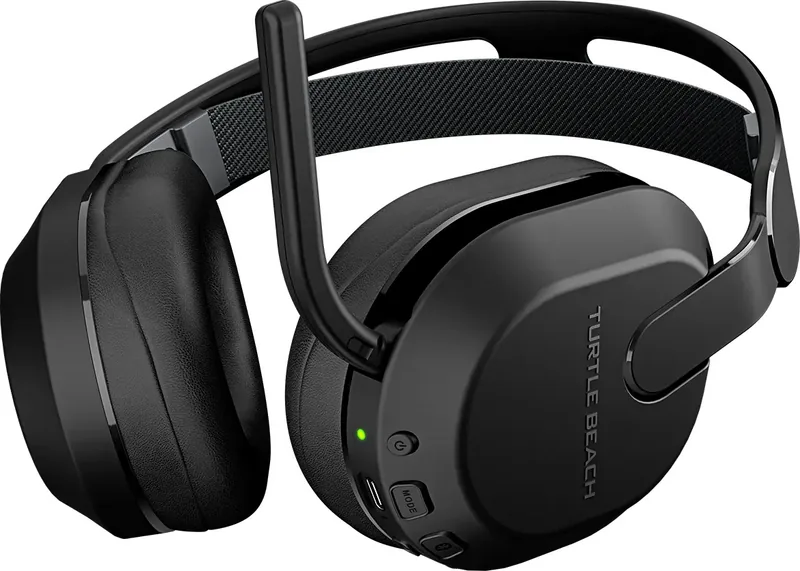
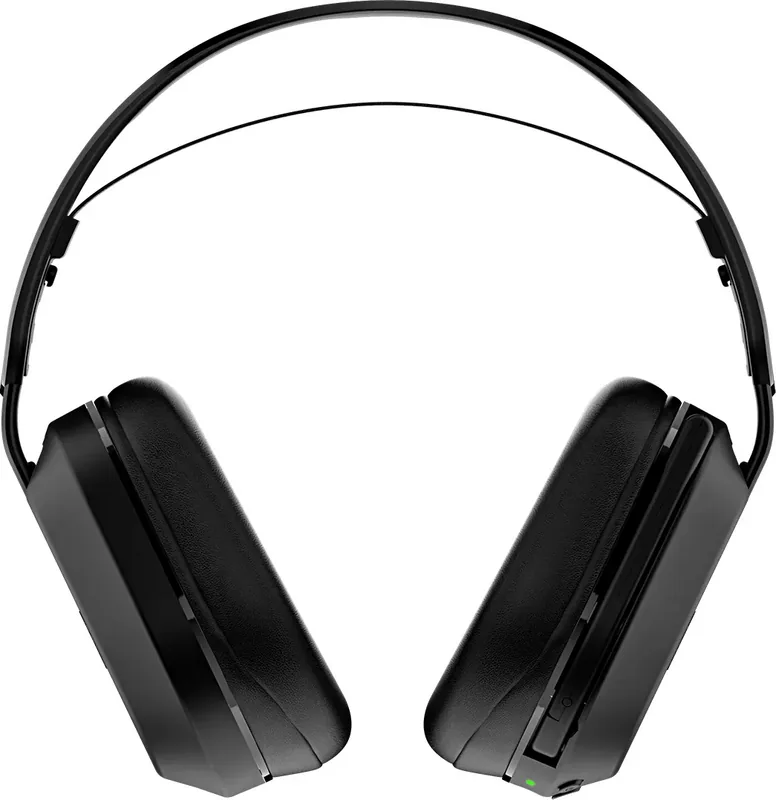
Los videojuegos exigen precisión. Entender cómo maximizar el potencial es clave. El Turtle Beach Stealth 500 (2024) representa un salto adelante en la tecnología de audio inalámbrico. Este auricular trae opciones de conectividad dual, permitiendo a los gamers cambiar sin esfuerzo entre conexiones inalámbricas de baja latencia y enlaces Bluetooth estándar. Ya sea dominando en consolas o gestionando chats de voz desde smartphones, la versatilidad define tu sesión.

Conectividad sin esfuerzo

Una característica destacada es la funcionalidad del botón QuickSwitch. Presionar esta tecla por un segundo alterna entre el modo inalámbrico dedicado 2.4GHz y las capacidades Bluetooth. La conexión 2.4GHz garantiza retraso de entrada mínimo, crítico para shooters de ritmo rápido. Por el contrario, Bluetooth abre puertas para transmisión de música y llamadas telefónicas. Esta flexibilidad elimina la necesidad de múltiples auriculares. Se aconseja a los usuarios priorizar el transmisor inalámbrico para juegos para acceder a funciones de audio avanzadas. La configuración implica enchufar el transmisor inalámbrico USB al puerto de la consola y encender el auricular hasta que se emparejen automáticamente. La señal permanece estable dentro del rango por horas.

Personalización y control

Personalizar los perfiles de sonido mejora la inmersión significativamente. Los controles a bordo permiten ajuste directo de mezclas de chat de juego y niveles de monitoreo de micrófono. En plataformas específicas, el monitoreo de micrófono variable permite a los jugadores escucharse claramente. Además, el refuerzo Superhuman Hearing ayuda a detectar pasos sutiles. Ajustar ajustes a través de la aplicación complementaria refina aún más la experiencia de escucha. La rueda Maestra de Volumen proporciona acceso rápido sin interrumpir el flujo. Los cojines de aislamiento de ruido aseguran que las distracciones externas permanezcan mínimas durante rondas críticas. Materiales cómodos soportan largas sesiones de juego.

Firmware y actualizaciones

Mantener el software actual es vital para la estabilidad del rendimiento. La aplicación Swarm facilita actualizaciones de firmware fáciles mediante interfaces móviles o de escritorio. Asegurar que tu dispositivo ejecute la última versión garantiza compatibilidad con nuevas actualizaciones del sistema. El mantenimiento regular a través del portal de soporte oficial extiende la vida útil. Las prácticas de carga adecuadas también contribuyen a la longevidad. Evita exponer la batería a temperaturas extremas. Seguir las pautas de uso seguro protege al usuario y el equipo. La salud de la batería depende de evitar ciclos de descarga profunda. Los puertos deben permanecer limpios.

Nota: Siempre verifica la compatibilidad con tu consola específica antes de la compra. Algunas características varían por región y número de modelo.

Especificidades por plataforma

Los diferentes ecosistemas requieren atención específica. Los usuarios de Xbox se benefician de funciones integradas de chat de partido, mientras que PlayStation ofrece mejoras de audio distintas. Los jugadores de PC utilizan la aplicación de escritorio para afinación granular de ecualizador. Los propietarios de Nintendo Switch disfrutan de reproducción portátil con fidelidad inalámbrica. El cumplimiento regulatorio asegura seguridad en todos los mercados principales. Las declaraciones de cumplimiento confirman que la exposición a radiofrecuencia se mantiene dentro de límites seguros. Seguir las instrucciones operativas previene interferencias. Priorizar la seguridad del usuario junto con la excelencia de rendimiento asegura disfrute para cada gamer que busca calidad de sonido de primera línea en cualquier entorno consistentemente.

Conclusión

Integrar este periférico simplifica el flujo de trabajo mientras maximiza la fidelidad de audio. Al dominar controles y aprovechar ecosistemas de software, los jugadores mantienen una ventaja competitiva. El cuidado adecuado asegura años de servicio confiable. Cada gamer buscando calidad necesita esta solución efectivamente.

M: QW-35-FL

© Copyright 2026 Manual.ly