

Reloop Mixon 8 Pro Manual
Manual en PDF · 44 Páginas
Español



Verificación rápida
Respuesta incorrecta, inténtalo de nuevo.
Chatee con su manual de Reloop Mixon 8 Pro usando IA
Obtenga respuestas instantáneas de IA de su manual de Reloop Mixon 8 Pro
Pregunte lo que quiera sobre Reloop Mixon 8 Pro. Las respuestas provienen de este manual, con las páginas en las que se basan.
Mixon 8 Pro Programa de mantenimiento
Revise regularmente el cable de alimentación, la carcasa y las piezas de desgaste como interruptores rotativos y deslizantes para garantizar la seguridad técnica.
Desconecte siempre el dispositivo del enchufe de suministro antes de limpiar. Utilice únicamente un paño húmedo; nunca utilice disolventes ni fluidos derivados del petróleo.
Haz una Pregunta
¿Recomiendas Mixon 8 Pro?
Sí NoPreguntas frecuentes
El Reloop Mixon 8 Pro funciona con Serato DJ Pro en PC y Mac. También es compatible con djay Pro AI en dispositivos iOS. Necesitará descargar el controlador o aplicación específica para su sistema operativo para asegurar el reconocimiento y la funcionalidad de control adecuados. Verifique los requisitos más recientes en las páginas de soporte oficiales.
¿Esta respuesta fue útil?
Sí, cuenta con entradas dedicadas para micrófonos. Los canales 3 y 4 pueden asignarse a entradas de micrófono. Esto le permite hacer anuncios o realizar mezclas en vivo sin equipo externo. Asegúrese de que la ganancia esté ajustada correctamente antes de su uso para evitar la distorsión de audio durante su actuación.
¿Esta respuesta fue útil?
Consulte las especificaciones de Serato o djay para los requisitos mínimos de PC. Generalmente, necesita un sistema operativo reciente y memoria RAM suficiente. También debe instalar el controlador ASIO apropiado para un rendimiento de audio óptimo en sistemas Windows. La compatibilidad varía según su configuración de hardware específica.
¿Esta respuesta fue útil?
No. No exponga el dispositivo a agua o fluidos. La humedad puede dañar los componentes internos y anular la garantía. Mantenga los líquidos alejados de la superficie de control y evite la operación en ambientes de alta humedad para prevenir descargas eléctricas o fallos. Siempre séquela unidad antes del almacenamiento prolongado.
¿Esta respuesta fue útil?
Use el puerto USB-C en el panel trasero conectado a su dispositivo iOS. Establezca el interruptor de fuente USB en modo iOS. Conecte su cable Lightning o USB-C en el controlador y su tableta. Abra la aplicación djay para establecer la conexión automáticamente sin configuraciones adicionales típicas.
¿Esta respuesta fue útil?
El panel trasero incluye entradas USB para computadoras, conexión de energía, salidas de maestro a través de XLR y RCA, salidas de cabina y terminales de tornillo de tierra. También hay entradas de línea para tocadiscos u otras fuentes de audio. Consulte el manual para detalles de pinout y diagramas de conexión para mejores resultados.
¿Esta respuesta fue útil?
Ventajas y Desventajas
Ventajas

- Compatible con el software Serato DJ Pro y djay Pro AI para un amplio uso.
- Incluye una estación de acoplamiento incorporada para una integración perfecta de dispositivos iOS.
- Ofrece 4 canales de mezclador con controles independientes de EQ y filtro.
- Calidad de construcción durable adecuada para transporte y uso regular.
- Conectividad versátil con salidas XLR y RCA para sonido profesional.
Desventajas

- Requiere controladores de software específicos para la funcionalidad completa en Windows.
- Sin batería incorporada, debe depender de la unidad de fuente de alimentación externa.
- Las funciones de menú complejas pueden ser desafiantes para los principiantes absolutos.
- El tamaño físico puede requerir espacio significativo en una configuración de mesa de DJ.
- Algunas funciones avanzadas necesitan una suscripción de software para el acceso completo.
Producto Especificación
Tipo
Controladora DJ de Software
Entradas
2x Entrada Línea Estéreo (RCA), 2x Entrada Fono/Línea Estéreo (RCA), Entrada Micrófono (XLR/6.35mm Combinado), Entrada Micrófono (Jack 6.35mm)
Salidas
Salida Línea Estéreo (XLR), Salida Línea Estéreo (RCA), Salida Línea Estéreo (Jack 6.35mm), Auriculares (Jack 3.5mm), Auriculares (Jack 6.35mm)
Conexiones Adicionales
USB-C, 2x USB-B
Platillos
2x 14,73 cm, Pantalla LCD
Características
Interfaz de Audio, Bucle Automático, Sincronización Automática, Contador BPM, Marcadores Rápidos, Efectos Integrados, Visualización de Forma de Onda
Dimensiones
65,71x39,09x6,81 cm
Peso
5,70 kg
Producto Descripción
Reloop Mixon 8 Pro Review
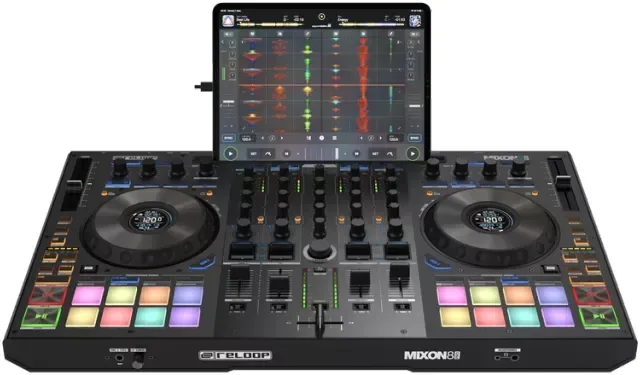
El Reloop Mixon 8 Pro se destaca como un versátil controlador de DJ de 4 canales diseñado para el rendimiento profesional. Este dispositivo se integra perfectamente con plataformas de software como Serato DJ Pro y djay Pro AI, ofreciendo una interfaz robusta. Ya sea que sea un DJ residente o un artista emergente, las especificaciones de hardware aseguran un flujo de trabajo fluido. La calidad de construcción refleja las expectativas de un dispositivo de mezcla premium con materiales duraderos utilizados en todo el chasis.
Conectividad y Configuración
Configurar el controlador es sencillo. Cuenta con entradas que incluyen salidas de maestro XLR, conexiones RCA y entradas dedicadas de micrófono. La unidad soporta tanto dispositivos iOS a través de una base de acoplamiento como conexiones de computadora estándar a través de puertos USB-B. Los usuarios deben asegurarse de revisar el Manual Reloop Mixon 8 Pro antes de la operación inicial para comprender los protocolos de seguridad relacionados con el voltaje y la exposición a líquidos. El aterramiento y la gestión de cableado adecuados son esenciales. El dispositivo cumple con las regulaciones de seguridad.
Características de Rendimiento
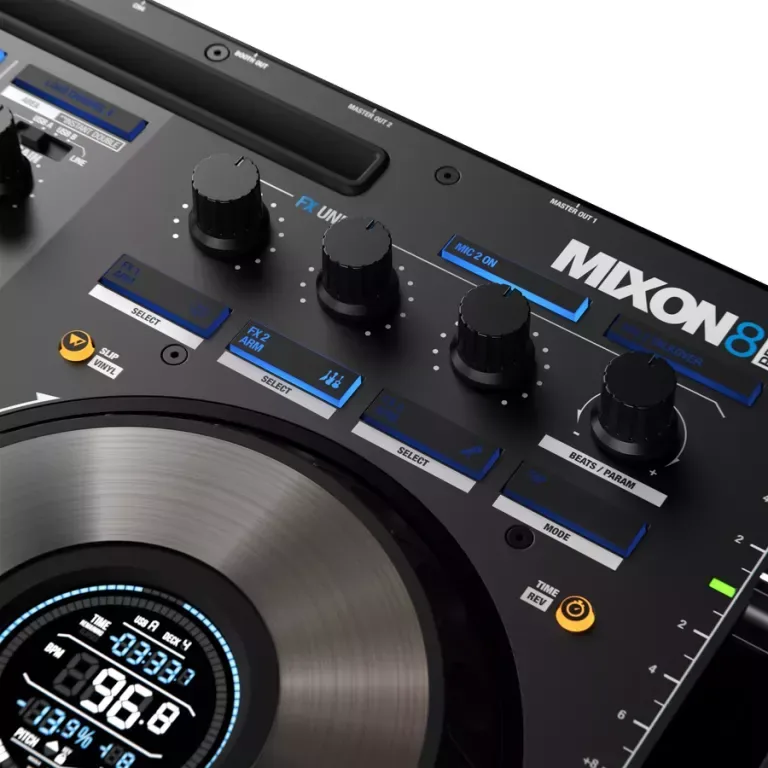
La sección del mezclador incluye controles de volumen independientes para las salidas maestro, cabina y cue. Ocho pads de rendimiento ofrecen funciones versátiles como marcadores rápidos. Las perillas de giro cuentan con capacidades de pitch bend e informan información como BPM. Los efectos avanzados pueden controlarse a través de codificadores dedicados. La perilla de filtro proporciona opciones de escultura de sonido creativa. Las curvas del crossfader pueden ajustarse para adaptarse a los estilos de mezcla personales.
Integración de Software
La compatibilidad es una fortaleza clave. Las guías de instalación detallan los pasos para entornos de macOS y Windows. Para usuarios móviles, la configuración de iOS implica conectar la estación de acoplamiento y encender correctamente. La configuración del software puede requerir habilitar permisos de acceso específicos. Asegúrese de que todos los controladores estén actualizados para el mejor rendimiento de latencia. El cable USB incluido conecta la unidad directamente a su computadora.
Seguridad y Mantenimiento
Mantener este equipo requiere adherirse a las normas de seguridad. Los usuarios deben evitar exponer el dispositivo a temperaturas extremas. Las revisiones regulares del cable de alimentación previenen peligros. Siempre desconecte la unidad de la fuente de alimentación antes de limpiar. Asegúrese de que los cables no estén aplastados. El manual ayuda a resolver preguntas operativas eficientemente.
Nota: Siempre mantenga las instrucciones operativas accesibles para futuras referencias sobre solución de problemas.
Conclusión
El Reloop Mixon 8 Pro ofrece una experiencia de alta calidad. Su compatibilidad lo convierte en una elección confiable. Siguiendo los procedimientos, los usuarios pueden maximizar la vida útil y el rendimiento de este controlador. Sigue siendo un básico para DJs que buscan precisión y confiabilidad.
Buscar: 67.732 Manuales en línea


Escribe la marca o modelo