Manual.ly Logo

Reloop Flux Manual

0,0 · 0 Valoraciones

Manual en PDF · 28 Páginas

Español

M: QW-35-FL
página

/ 28

Loading...
f66273e5d7cf7a97c3b0193f1b64d2ca430f page 2
ENGLISH
2
ATTENTION! For your own safety, please read this operation manual carefully before the initial operation! All
persons involved in the installation, setting-up, operation, maintenance and service of this device must be
appropriately qualied and observe this operation manual in detail. This product complies with the requirements
of the applicable European and national regulations. Conformity has been proven. The respective statements and
documents are deposited at the manufacturer.
Before operating this equipment we ask you to carefully study and observe all instructions. Please remove the FLUX
from its packaging. Check before an initial operation to make sure that the device has not been visibly damaged during
transport. If you detect any damage to the USB cable or the casing, do not operate the device. Contact your specialized
dealer.
SAFETY INSTRUCTIONS
CAUTION! Please exercise particular caution when handling power voltage. This voltage rating may lead to a
critical electrical shock! Any damage caused by the non-observance of this operation manual excludes any
warranty claims. The manufacturer is not liable for any damage to property or for personal injury caused by
improper handling or non-observance of the safety instructions.
- This device left the factory in perfect condition. To maintain this condition and to ensure a risk-free operation the user
must observe the safety instructions and warnings contained in this operation manual.
- For reasons of safety and certication (CE) the unauthorized conversion and/or modication of the device is prohibited.
Please note that in the event of damage caused by the manual modication to this device, any warranty claims are
excluded.
- The inside of the device does not contain any parts which require maintenance, with the exception of worn parts that can be
exchanged from the outside. Qualied staff must carry out maintenance, otherwise, the warranty does not apply!
- Ensure that the power will only be supplied after the device has been fully set up. Always plug in the USB plug last.
- Only use cables that comply with regulations. Observe that all jacks and bushes are tightened and correctly hooked
up. Refer to your dealer if you have any questions.
- Ensure that when setting up the product the USB cable is not squashed or damaged by sharp edges.
- Disconnect the device when not in use and before cleaning! Be sure to hold the USB plug by the body. Never pull the USB cord!
- Position the device on a horizontal and stable base.
- Avoid any concussions or violent impact when installing or operating the device.
- When selecting the location of installation make sure that the device is not exposed to excessive heat, humidity, and
dust. Be sure that no cables lie around openly. You will endanger your own safety and that of others!
- Do not rest any containers lled with liquid that could easily spill onto the device or its immediate vicinity. If, however,
uids should access the inside of the device, immediately disconnect the USB plug. Have the device checked by a
qualied service technician before reuse. Damage caused by uids inside the device is excluded from the warranty.
- Do not operate the device under extremely hot (in excess of 35° C) or extremely cold (below 5° C) conditions. Keep the
device away from direct exposure to the sun and heat sources such as radiators, ovens, etc. (even during transport in
a closed vehicle). Never cover the cooling fan or vents. Always ensure sufcient ventilation.
- The device must not be operated after being taken from a cold environment into a warm environment. The
condensation caused at this moment may destroy your device. Do not switch on or operate the device until it has
reached ambient temperature!
- Controls and switches should never be treated with spray-on cleaning agents and lubricants. This device should only
be cleaned with a damp cloth. Never use solvents or cleaning uids with a petroleum base for cleaning.
- When relocating, the device should be transported in its original packaging.
- At commercial facilities, the regulations for the prevention of accidents as stipulated by the organization of professional
associations must be observed.
- At schools, training facilities, hobby and self-help workshops the operation of the device must be monitored with
responsibility by trained staff.
- Keep this operation manual in a safe place for later reference in the event of questions or problems.
APPLICATION IN ACCORDANCE WITH REGULATIONS
- This device is a professional USB-C DVS interface. The FLUX interface converts the control signal coming from
each deck into digital audio, to be sent via USB to the Serato DJ software, which decodes that signal into a stream
of information based on what the DJ is doing with the control disc. A virtual “deck” replicates the movements of the
control disc. Audio les loaded onto the virtual decks are then played back through the outputs of the hardware, with
any manipulation of the control disc reproduced on the audio, effectively emulating vinyl control of the les loaded
into the software.
- If the device is used for other purposes than those described in the operation manual, damage can be caused to the
product, leading to the exclusion of warranty rights. Moreover, any other application that does not comply with the
specied purpose harbors risks such as short circuits, res, electrical shocks, etc.
MAINTENANCE
- Check the technical safety of the device regularly for damage to the USB cable or the casing, as well as for wear out
of wear parts such as buttons and switches.
- If it is to be assumed that a safe operation is no longer feasible then the device must be disconnected and secured
against accidental use. Always disconnect the USB cable from the outlet!
- Disconnect the USB cable from your computer.
- It must be assumed that a safe operation is no longer feasible if the device bears visible defects, if the device no longer
functions, following longer storage under unfavorable conditions or after major transport stress.

Chatee con su manual de Reloop Flux usando IA

Obtenga respuestas instantáneas de IA de su manual de Reloop Flux

Pregunte lo que quiera sobre Reloop Flux. Las respuestas provienen de este manual, con las páginas en las que se basan.

Flux Programa de mantenimiento

Regularmente
Inspeccione la seguridad técnica del dispositivo

Compruebe el cable USB y la carcasa en busca de daños. Inspeccione las piezas de desgaste, como botones e interruptores, por signos de desgaste.

Mostrar en el manual (página 2)
Antes de limpiar
Desconecte el dispositivo de la corriente

Desconecte siempre el conector USB sujetando el cuerpo del enchufe antes de limpiar el dispositivo para evitar descargas eléctricas.

Mostrar en el manual (página 2)
Según sea necesario
Limpie la carcasa con un paño húmedo

Limpie el dispositivo solo con un paño húmedo. Nunca utilice disolventes, líquidos de limpieza a base de petróleo o agentes en aerosol sobre los controles.

Mostrar en el manual (página 2)
M: qwen/qwen3.8-flash

Haz una Pregunta

0/1000

¿Recomiendas Flux?

Sí No

Preguntas frecuentes

A

Descargar desde el sitio de Serato. El software se activa con el dispositivo. Instale el controlador ASIO si se solicita en Windows. Controlador ASIO manual disponible en el sitio web.

¿Esta respuesta fue útil?

A

Sí con modo Thru, pero se necesita alimentación externa. Conecte el suministro de energía USB-C para usar salidas sin PC.

¿Esta respuesta fue útil?

A

2 A o más. Fuente DC externa recomendada para uso de hub activo. Alimentación bus USB mínimo 400 mA.

¿Esta respuesta fue útil?

A

Usar la aplicación Reloop Firmware Update App. Requiere Java Runtime Environment. Siga los pasos en pantalla. La actualización tarda de 3 a 5 minutos.

¿Esta respuesta fue útil?

A

Conectar entradas RCA a los tocadiscos. Adjuntar cable de tierra al terminal. Establecer conmutador Phono/Line hacia ARRIBA para tocadiscos.

¿Esta respuesta fue útil?

A

Sí vía USB-C PD si alimentación externa enchufada a Flux. Asegure al menos 15 vatios disponibles del suministro.

¿Esta respuesta fue útil?

A

160 por 120 por 34 mm. El peso es 0.85 kg. El diseño compacto cabe fácilmente en racks estándar.

¿Esta respuesta fue útil?

M: QW-35-FL

Ventajas y Desventajas

Ventajas

  • Licencia Serato DJ Pro y DVS integrada incluida
  • Soporte de tres decks para configuraciones expandidas
  • Hubs USB activos para múltiples accesorios
VS

Desventajas

  • Requiere alimentación externa para Thru sin computadora
  • No se permite mantenimiento interno por el usuario
  • Debe esperar la temperatura ambiente después del transporte frío
M: QW-35-FL

Producto Especificación

Interfaz

USB-C 2.0

Canales de entrada

6

Canales de salida

6

Preámps de micrófono

No

Entradas analógicas

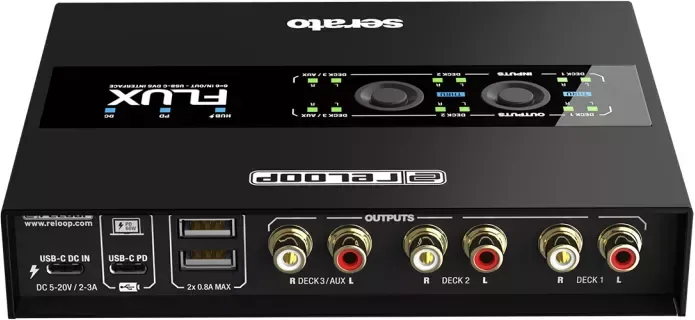
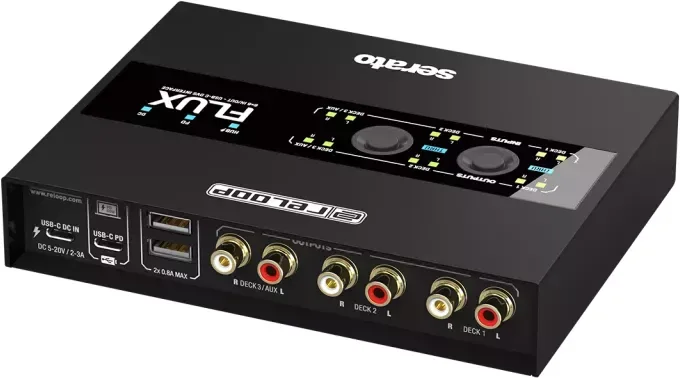
3x Phono/Línea estéreo de entrada (RCA)

Salidas analógicas

3x Línea estéreo de salida (RCA)

Entradas digitales

No

Salidas digitales

No

Convertidor AD/DA

24 bits/96 kHz

Características

Alimentado por bus

Dimensiones

16,00 x 3,40 x 11,99 cm (Ancho x Alto x Profundidad)

Peso

0,85 kg

M: QW-35-FL

Producto Descripción

Reseña de Reloop Flux

El Reloop Flux destaca como una interfaz profesional USB-C DVS diseñada para configuraciones de DJ modernas. Permite a los DJs digitalizar su control de vinilo con precisión. Esta unidad conecta tocadiscos directamente al software Serato DJ. Cada movimiento del disco de control se replica virtualmente. Obtienen control digital sin sacrificar la sensación de medios analógicos.

Características Avanzadas de Control

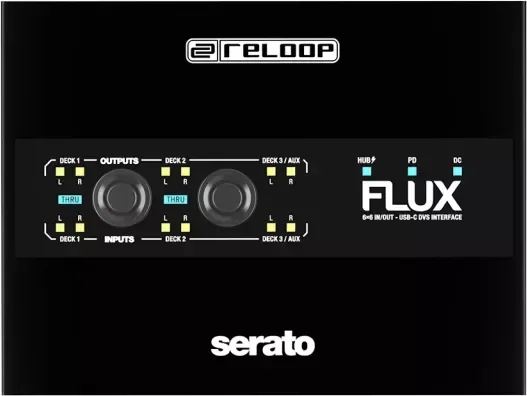
Gestionar señales de audio es sencillo con tres entradas de decks. Cada entrada soporta fuentes Phono y Line. Cambian los conmutadores para ajustar al equipo. La interfaz incluye LEDs de estado de entrada y salida. Indican niveles de señal y riesgos de clipping en tiempo real. Dos hubs USB activos permiten conectar controladores MIDI fácilmente. Power Delivery es manejado a través de un puerto USB-C. Conecte una fuente de alimentación DC externa.

Integración y Software

Las licencias Serato DJ Pro y Serato DVS están integradas. No se requieren claves extra. El software se activa automáticamente. Los usuarios de Windows necesitan el controlador ASIO. Encajar en un equipo de gira es sencillo. Mide 160 por 120 milímetros. Con 0.85 kg sigue siendo portátil. Las instrucciones de seguridad son vitales. Manténgalo seco. No abra la carcasa. El Manual Reloop Flux proporciona pautas. Evite líquidos. Limpie con paño húmedo. Transporte en el embalaje. La ventilación es clave. No cubra las rejillas. Si está frío, caliente en interior. Los botones Thru permiten el bypass sin computadora. Útil para sets solo con vinilo. La gestión de energía se ajusta. La alimentación por bus USB funciona pero se recomienda fuente externa. Consulte el sitio web para actualizaciones de firmware.

Calidad de Audio y Seguridad

La calidad de audio soporta alta resolución. Maneja archivos de 24 bits a varias tasas de muestreo hasta 96 kHz. La relación señal-ruido supera 83 dB en entradas Line. Esto asegura sonido limpio para venues profesionales. El control de ganancia varía entre modos Phono y Line. Se gana hasta 36 dB para tocadiscos. Las entradas Line requieren mucho menos. La salida máxima supera 11 dBV. Esto impulsa mezcladores de manera efectiva.

La seguridad es primordial durante la operación. Riesgo de descarga eléctrica existe con manejo incorrecto de voltaje. Siga todas las instrucciones de configuración cuidadosamente. No opere en calor extremo por encima de 35 C. La humedad también representa riesgos. El polvo puede degradar componentes internos con el tiempo. Si fluidos entran, desconecte inmediatamente. Contacte servicio para inspección. Modificación no autorizada invalida reclamos de garantía. El mantenimiento se limita a partes externas. Personal calificado debe manejar reparaciones internas. Guarde la guía para referencia futura.

Las opciones de conectividad soportan flujos de trabajo. Alimenta computadora vía USB-C PD. Esto usa 15 vatios mínimo. El hub entrega potencia máxima. Dos puertos permiten 0,8 amperios cada uno. Soporta accesorios. Las luces muestran el modo de energía. Pasivo cuando USB-A. Activo con suficiente potencia. Ayuda a resolver problemas.

M: QW-35-FL

© Copyright 2026 Manual.ly